Subsequenty Versions
In this section we walk through making our second commit and comparing commits.
What has changed (diff, log, show)
At the end of this section we will have created our next version. In the process we well learn the diff, log,
and show commands
With our base version committed, it is time to start working on the next generation of our commands. The output of the
igc-date.sh command is DDMMYY.
[tyson@l1.nibi ~]$ bash igc-date.sh flights/04616075.igc
110916
This is frequently ambiguous with MMDDYY and YYMMDD, so lets switch to the ISO startard YYYY-MM-DD TIMEZONE.
We could do this using echo $VARIABLE | cut -c START-END, but lets use bash’s substring expansion
${VARIABLE:START:LENGTH} instead to be more efficient
[tyson@l1.nibi ~]$ nano igc-date.sh
[tyson@l1.nibi ~]$ cat igc-date.sh
date=$(grep ^HFDTE flights/0144f5b1.igc | cut -c 6-)
echo 20${date:4:2}-${date:2:2}-${date:1:2}
[tyson@l1.nibi ~]$ bash igc-date.sh flights/04616075.igc
2016-11-09
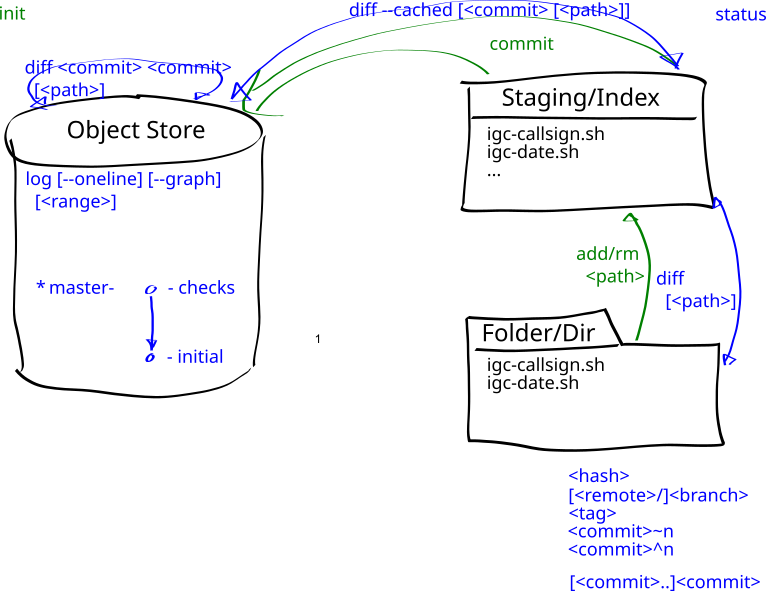
After making these edits, the status command now shows we have uncommitted work
[tyson@l1.nibi ~]$ git status
On branch master
Changes not staged for commit:
  (use "git add <file>..." to update what will be committed)
  (use "git restore <file>..." to discard changes in working directory)
	modified:   igc-date.sh

...
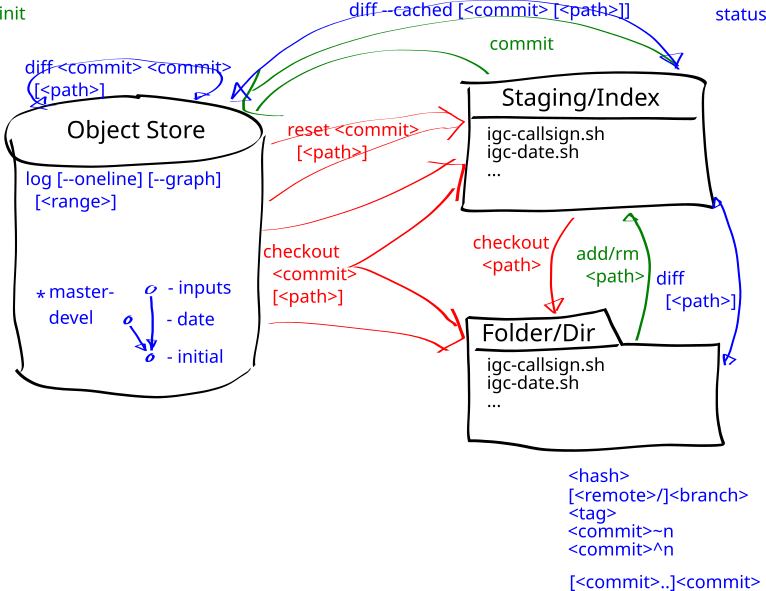
We can use the diff command, optionally with a filename, to show what has changed
[tyson@l1.nibi ~]$ git diff
diff --git a/igc-date.sh b/igc-date.sh
index a5a633e..6b91162 100644
--- a/igc-date.sh
+++ b/igc-date.sh
@@ -1 +1,2 @@
-grep ^HFDTE flights/0144f5b1.igc | cut -c 6-
+date=$(grep ^HFDTE flights/0144f5b1.igc | cut -c 6-)
+echo 20${date:4:2}-${date:2:2}-${date:1:2}
Once we are satisfied with our changes, we use the add command again to stage the next version
[tyson@l1.nibi ~]$ git add igc-date.sh
After this the diff command will not show any changes. The reason for this is it defaults to showing the
difference between the working tree and the stagging area. We can use the --cached option, optionally with a
filename, to show the difference between the commited version and the index
[tyson@l1.nibi ~]$ git diff --cached igc-pilot.sh
diff --git a/igc-date.sh b/igc-date.sh
index a5a633e..6b91162 100644
--- a/igc-date.sh
+++ b/igc-date.sh
@@ -1 +1,2 @@
-grep ^HFDTE flights/0144f5b1.igc | cut -c 6-
+date=$(grep ^HFDTE flights/0144f5b1.igc | cut -c 6-)
+echo 20${date:4:2}-${date:2:2}-${date:1:2}
Once satisfied we can commit the next version with commit and the commit message Output ISO YYYY-MM-DD dates as
IGC DDMMYY is ambiguous
[tyson@l1.nibi ~]$ git commit -m 'Output ISO YYYY-MM-DD dates as IGC DDMMYY is ambiguous'
[master 72b5912] Output ISO YYYY-MM-DD dates as IGC DDMMYY is ambiguous
 1 file changed, 2 insertions(+), 1 deletion(-)
Now that we have more than one version, we can use the log command to view our commit history
commit 72b5912387f3433ca80feab032697025faeb52f6 (HEAD -> master)
Author: Tyson Whitehead <twhitehead@gmail.com>
Date:   Wed Jun 10 07:53:59 2026 -0400

    Output ISO YYYY-MM-DD dates as IGC DDMMYY is ambiguous

commit 7c015c8799f17d9883e47f01b50b8bda6eeeeed3
Author: Tyson Whitehead <twhitehead@gmail.com>
Date:   Tue Jun 9 23:37:39 2026 -0400

    Initial version of IGC commands from The Shell course
Each commit has a unique hexadecimal commit identifier that can be used to refer to it. Frequently we only specify
the first seven digits as as this is almost always enough to uniquely identify each commit. The --oneline
options gives a nice compact display using this and just the first line of the commit meesage
[tyson@l1.nibi ~]$ git log --oneline
72b5912 (HEAD -> master) Output ISO YYYY-MM-DD dates as IGC DDMMYY is ambiguous
7c015c8 Initial version of IGC commands from The Shell course
With the commit identifiers we can our working tree, or the index with the --cached option, to any commit
[tyson@l1.nibi ~]$ git diff 7c015c8
diff --git a/igc-date.sh b/igc-date.sh
index a5a633e..6b91162 100644
--- a/igc-date.sh
+++ b/igc-date.sh
@@ -1 +1,2 @@
-grep ^HFDTE flights/0144f5b1.igc | cut -c 6-
+date=$(grep ^HFDTE flights/0144f5b1.igc | cut -c 6-)
+echo 20${date:4:2}-${date:2:2}-${date:1:2}
or even any two commits
[tyson@l1.nibi ~]$ git diff 7c015c8 72b5912
We can also view old version of directories and files by specifying a COMMIT:[PATH] to the show command
[tyson@l1.nibi ~]$ git show 7c015c8:
tree 7c015c8:

igc-callsign.sh
igc-date.sh
igc-end.sh
igc-pilot.sh
igc-start.sh
[tyson@l1.nibi ~]$ git show 7c015c8:igc-pilot.sh
grep ^HFDTE flights/0144f5b1.igc | cut -c 6-
Branching (branch)
At the end of this section we will have created our first branch. In the process we will learn the branch and checkout
commands